Using your iPhone (or iPad) as a camera continues to get easier and more flexible. Blackmagic Camera and Apple’s own Final Cut Camera each got significant updates recently. Apple wins here either way, but the Blackmagic app in particular opens up a lot of options, including with an optional dock. Full-quality codecs and live HDMI output are suddenly the norm. Let’s have a look.
I love this, too, because in tough economic times, here are some ways to up your production game for a minimal or even free investment. Use what you’ve got, every time.
I have actually never been skiing, but if it’s hot where you are, enjoy that image.
Final Cut Camera’s update this week comes alongside an update to Apple’s creative apps — the apps formerly known as “Pro Apps,” now offered as part of the Apple Creator Studio. More on that shortly. But both the Apple and Blackmagic apps are worth a look, and the Blackmagic app in particular is becoming a standard for iPhone video makers.
Live HDMI out is natively supported on the iPhone 17 Pro and better. But since I’m all about acquiring used gear and keeping what you own working as long as possible, you can also use HDMI output (and a bunch of other features) on the iPhone 15 Pro, iPhone 15 Pro Max, iPhone 16 Pro, and iPhone 16 Pro Max models using a new Blackmagic dock.
Let’s break this down quickly.
Both apps are free, so there’s really no reason not to keep both around.
Final Cut Camera
Final Cut Camera was a later entry in this game, but it’s worth a look, partly because of Apple’s support for its own codecs.
New in version 2.3, released this week:
- Use Clean HDMI Out to send a clean video feed without overlays to an external monitor or recorder so you can stay focused on the image being captured (requires iPhone 17 Pro)
- Choose from ProRes 422 HQ, ProRes 422, or ProRes 422 LT for incredible video fidelity and editing performance, with more options to balance image quality and file size (requires iPhone 13 Pro or later)
- Disable digital zoom to ensure every shot records at full optical resolution [please!]
- Easily connect your iPhone to your Mac and import your media from Final Cut Camera into Final Cut Pro [finally!]
And don’t forget that version 2.0, released in the fall alongside the iPhone 17, added a bunch of features:
- Capture ProRes RAW in open gate for full-frame resolution and incredible editing performance. [on supported models]
- Record in high dynamic range and an even wider color gamut with Apple Log 2 in ProRes or HEVC. [on supported models]
- Easily enable timecode options including Time of Day, Record Run, or external timecode for precise identification of your footage. (Requires iOS 26.)
- Genlock multiple video sources with precise frame alignment using a compatible sync generator. [iPhone 17 Pro+]
- Quickly switch to the 200mm (8x) telephoto lens to capture the perfect shot. [on supported models]
- Dynamically adjust the video orientation to vertical or horizontal with the front-facing camera, regardless of how you hold your iPhone. [iPhone 17+]
I think I got those caveats correct. The iPhone 17 Pro introduced a bunch of video features; 15 and 16 generation Pro models did, as well. But some of these fit more in nice-to-have — especially given we’re still talking a phone camera — so there’s honestly more than enough in the way of pro features in any recent iPhone model, given it’s your freakin’ phone.
Talking about ProRes with internal phone storage may sound ludicrous. Most people are at this point using external storage, which nowadays is pretty mobile. (Grab that before RAMageddon makes it impossible!) Blackmagic’s approach — see below — is to use the cloud as an alternative.
iPhone 13 Pro introduced ProRes and Log encoding. 15 Pro and better can shoot in 4K.
16 Pro adds ProRes RAW. (For some reason I thought this was 17 Pro+, but that may be app-specific?) See Apple’s own explainer:
Here’s AppleInsider’s explainer from a year ago, which amusingly starts in a sort of 90s infomercial tone:
Blackmagic Camera and Camera ProDock
Apple used to evangelize pro apps pretty heavily, but as the company has grown, it seems like they’re spread a little thin. No matter: Blackmagic is arguably evangelizing iOS camera work better than Apple themselves are (apart from occasional hype around the iPhone event). So Blackmagic dropped this video for Blackmagic Camera iOS 3.3 today (though the update itself is from April):
Blackmagic lagged Apple — Final Cut Camera launched with the iPhone 17. But the options here are great, and for solo work, that Apple Watch integration is a seriously useful remote control, not just a gimmick. (It can also come in handy when using a gimbal, including those from DJI et al.)
Camera 3.3 features:
- Camera control with companion app for Apple Watch.
- Support for full screen portrait mode HDMI output.
- Support for ProRes RAW stabilization in iOS 26.1 and above.
- Support for ATEM camera control with Blackmagic Camera ProDock.
- Support for Blackmagic Focus and Zoom demands.
- Front camera now supports portrait and landscape without rotation for iPhone 17.
- Addressed possible issue recording ProRes RAW from front lens.
- Addressed preview lag with Blackmagic Camera ProDock as audio source.
- Addressed open gate H.264 and H.265 using incorrect bit rates.
- General performance and stability improvements.
Plus, don’t forget that last year’s update included a ton of live streaming features.
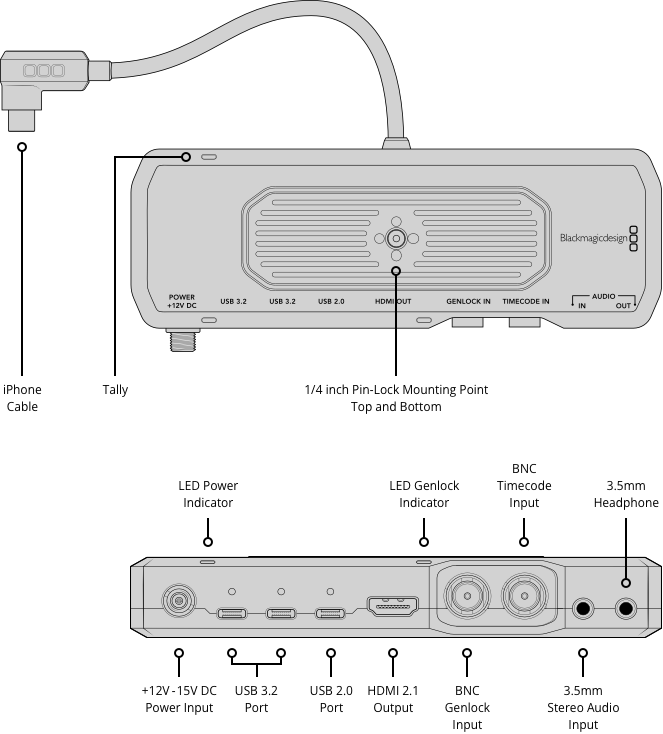
The dock they’ve got looks seriously terrific — 9.52 oz. / 270 g and an enclosure barely bigger than the ports it provides, and you get:
- HDMI monitoring
- BNC connections
- External genlock (genlock input requires iPhone 17 Pro+) and timecode (that works on older models)
- 3.5 mm connections for mics, headphones
- USB-C (three of them!) for external disks and power
Apple must like this thing as it’s even at the Apple Store for three hundred bucks (USA).
And look at all the supported devices ( iOS 16.6 or later/iPadOS 18 or later):
- iPhone Pro Max
- iPhone Pro
- iPhone Plus
- iPhone SE
- iPad Pro
- iPad Air
- iPad
- iPad Mini
Clean out your closet! Take that device your coworker/family member/ex doesn’t want any more!
genlock is a big deal — you can finally shoot LED walls without flickering or tearing. Expense that one! For the rest of us, though, you can get all the features, even multicam sync, with previous iPhone models. (Not expensing? Run that phone into the ground!)
Even if you rely on other cameras for a shoot, this adds flexibility for streaming and monitoring with an iPhone doing double duty.
More on this solution:
I say maximize those electronics. Honestly, it’s weird to me that we’re suddenly fetishizing all kinds of creative ways of disabling our smartphones. I’m all for recycling, reusing, and cutting consumption. But if you own this incredibly advanced sensor/supercomputer device, you should absolutely maximize what it does. The iPhone 13 is a kind of baseline for a lot of this work, but I have a spare iPhone 12 and even that is pretty capable.
Combine all of this with LUTs support — and those same LUTs in Final Cut Pro or Resolve once you get back to your desktop environment — and this is a seriously powerful solution.
And there’s a free Blackmagic Camera for Android, too.
Obviously, part of why I’m covering this on CDM is I’m really curious to see how these get integrated into live and VJ applications, where the mobility of the phone gets really interesting. Plus I know you have some LED wall stuff you want to record without the tearing and flickering.
Where’s my V4?
Discuss.