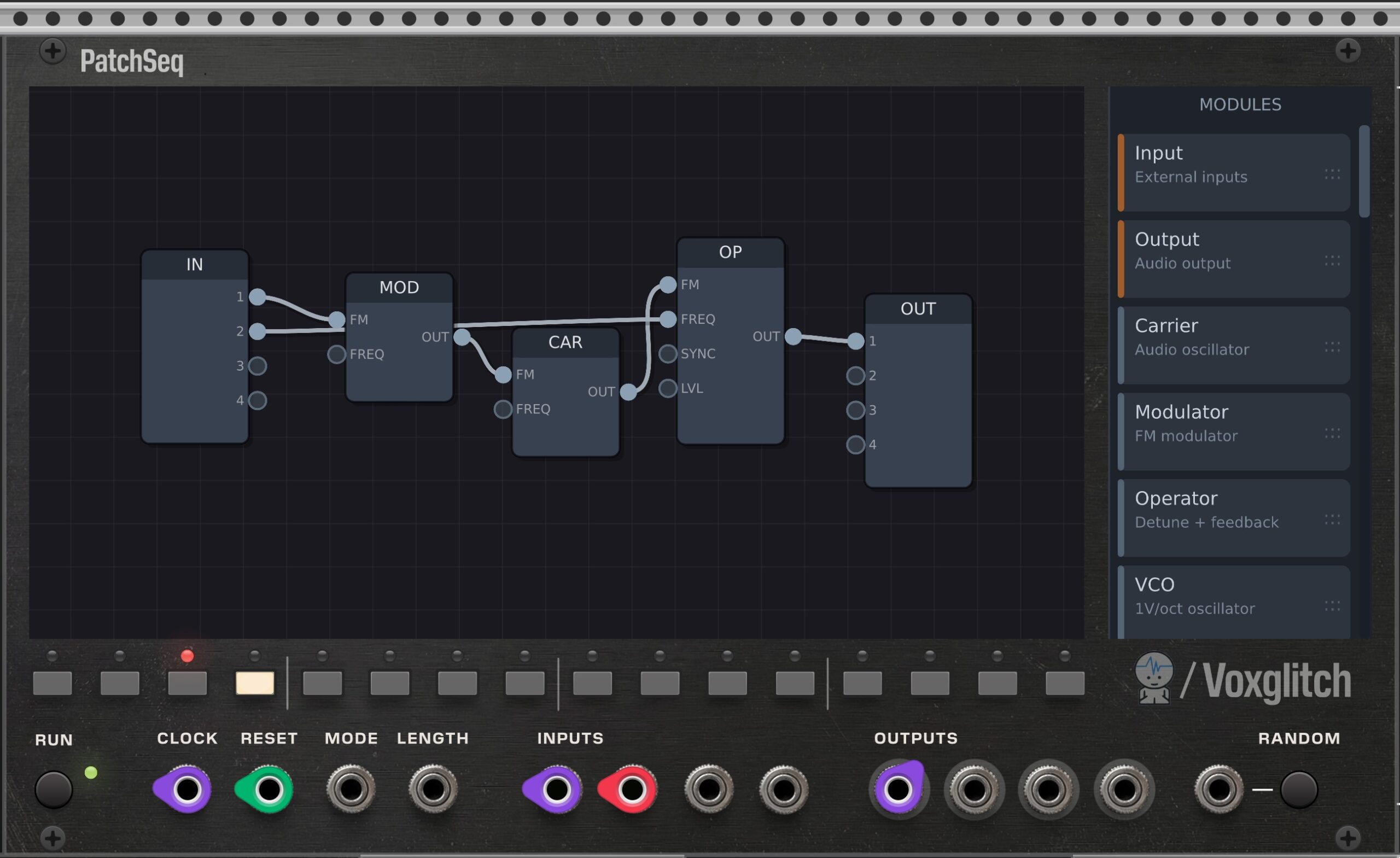
It’s a patcher inside a patcher. And that patcher has more patches that you can copy, randomize, and sequence. And in that patcher is a ton of glitchy goodness. PatchSeq, hot off the grill from Jeremy Wentworth and Voxglitch, is something special.
We are getting seriously nested now. In addition to the other ways of running stuff inside other stuff inside VCV Rack, you now get a dedicated module that has its own patching environment inside. If that sounds bonkers, it is. But once you get going with PatchSeq, it all starts to make sense. I mean, weirdo, glitchy, wall-rattling FM sense, but sense nonetheless.
I spoke with Jeremy (JW Modules) and the lead developer, Bret Truchan (Voxglitch), to understand the demented logic that made them produce this wonder of byte-mangling sound.
“The inspiration came from Jeremy’s Random Sound module, which is fantastic,” Bret tells CDM:
Jeremy has been very supportive of my modules for a while, and I thought it would be a good opportunity to collaborate with him on something new. This module started off as “FM Patch Sequencer” with a focus on FM patches, but grew generic enough that we decided to rename it to, simply, “Patch Sequencer”.
In addition, I’ve played with the idea of a “modular in a module” before. I have approached the idea two or three times already, leaving a junkpile of almost-shippable code in my wake.
If you’re wondering why you wouldn’t do this with a patcher-in-a-patcher rather than conventional Rack modules, that becomes clear as you use PatchSeq. As the name implies, you can sequence in the module. Each step can be its own patch. Copy a patch to any location — a quick way to make variations. Or even consider randomizing the entire step.
And then there’s just the sheer, crunchy-glitchy character of the whole thing — “FM-slanted” as Bret describes it. If you’re imagining tame, buttoned-down DX7 or Operator programs, think again. The sounds are hard-edged, lo-fi digital with screaming FM ranges. Everything is nicely tuned for satisfaction, but with some serious mayhem.
There’s a nice range of modules — a mind-boggling assortment, really, given these are modules inside another module:
- Carrier, Modulator, Operator (for synthesis and FM)
- Standard 1V/oct oscillator
- Integrated Voice (VCO + ADSR + VCA + Filter)
- KickDrum and SnareDrum synths
- A crazy-sounding ByteBeat audio generator
- Sampler with position
- ADSR Envelope
- LP/HP/BP Filter
- Comb filter
- Pitch shifter
- Ring Mod
- Wavefolder
- Delay
- Shroeder Reverb (sounds really nice, actually)
- Sequencer and PatGen pattern generator
- Scale Quantizer, VCA, Attenuverter, Scale (with offset), Constant output, Slew, Clock
It’s so many that I was wishing for a text box rather than scrolling — but it’s awesome to have all this power. Plus, you get four inputs and four outputs, which you can use freely in any patch as audio, CV, gate, or whatever you like.
The workflow is simple: select a step, drag the modules you want, and manually route inputs and outputs.
The sequencer runs independently, with different play directions (including random), skip steps and length, and its own clock, reset, length, and even mode CV inputs. This does get a little confusing with the internal patches, as you need to route any triggers separately — there’s not yet a trigger module that creates an internal trigger event as a step is played. (I made that request already; stay tuned!) But you can route clock from the Clock input on the panel to the internal Clock generator module. It has both a synced (external) and free-running (internal) mode.
What’s powerful is that you can do this for each step, and select them manually — great for variations or song structure — or sequence them.
There’s also a powerful randomization feature. You can select an empty step and randomly generate a patch with various constraints; there are even selectable “strategies” for determining the kind of patch you get. Bret explains:
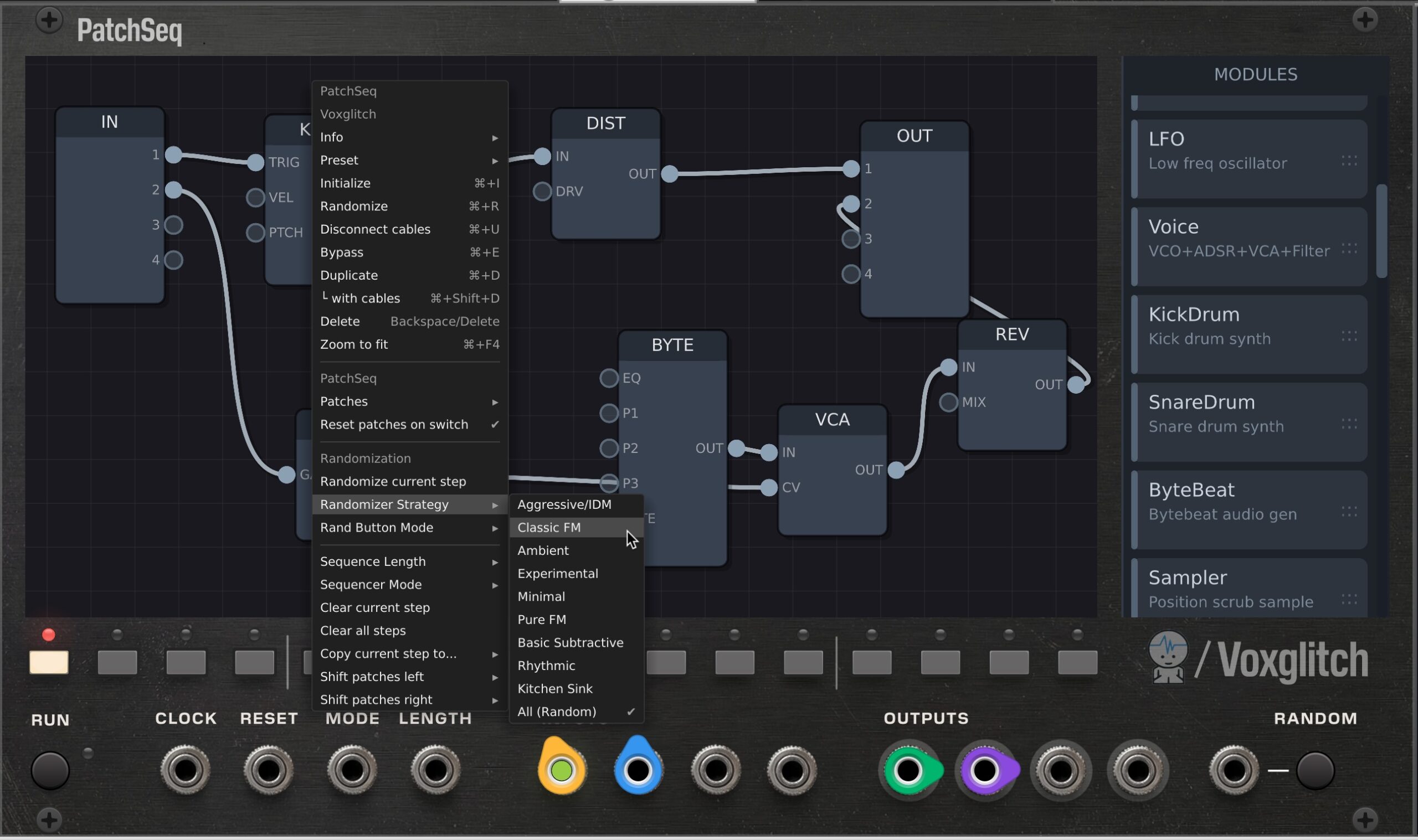
The mechanics are fairly simple. Imagine an ADSR which has a gate input. When randomizing a patch containing an ADSR, it’s pretty important for something to provide a gate style input to the ADSR. Different randomization strategies decide how often other modules are attached to that input. For example, it’s highly likely that a clock or sequencer output might be attached to the ADSR gate input, and less likely that a delay effects output would be attached. The randomization strategies decide what modules can be present in the patch, how they’re connected, and what the maximum module count is.
There are lots of little tweaks and tricks packed in there, and fun stuff to discover, even just with the tuning of the ranges. Some of that comes from Jeremy’s use and suggestions. “Like you can hit ‘r’ over a patch to randomize one patch, you can shift-click steps to mute or skip them,” Jeremy tells CDM.
I’m sold. This is totally addictive. And it doesn’t have to be distracting, either — it’s great being able to add weird bleeps and blorps inside your other patches.
Check it out on the VCV Rack Library:
Readme/docs (documentation wasn’t quite done as I ran this to press so — it must be possible to use without the manual, since I did!)
There’s more in store, too. You heard it here on CDM first: Bret tells us there’s a sibling for this project in nearing release.
I have another, very similar module coming soon called the “Groovebox Advanced”, which packs a bit more power, but is more pragmatic — less experimental.
Ooh, I’d be happy to run both at once. I was already mixing and matching the “experimental” weirdness with more predictable patches and hear a lot of that in Jeremy’s work, too.
I went a little nuts in my first go. If you want this to sound like a 90s computer modem gone rogue, you can!
Here it is in action in a second project. You’ll see you can click around to patch steps or trigger them, and randomize even on the fly. Fun!