Quick access to mutes is a must-have in any live performance context. Elektron owners have enjoyed that on the Analog Rytm; now it’s Push’s turn.
This is probably the most important tool I’ve ever tried out with Push, short of what Ableton themselves shipped. Mutes are everything when it comes to any percussive part. And it’s an obvious omission on the Push line.
Running this is simple. You load the device onto a MIDI track (like a Drum Rack), and it take over the Push. There are two ways to switch over into Mute Mode:
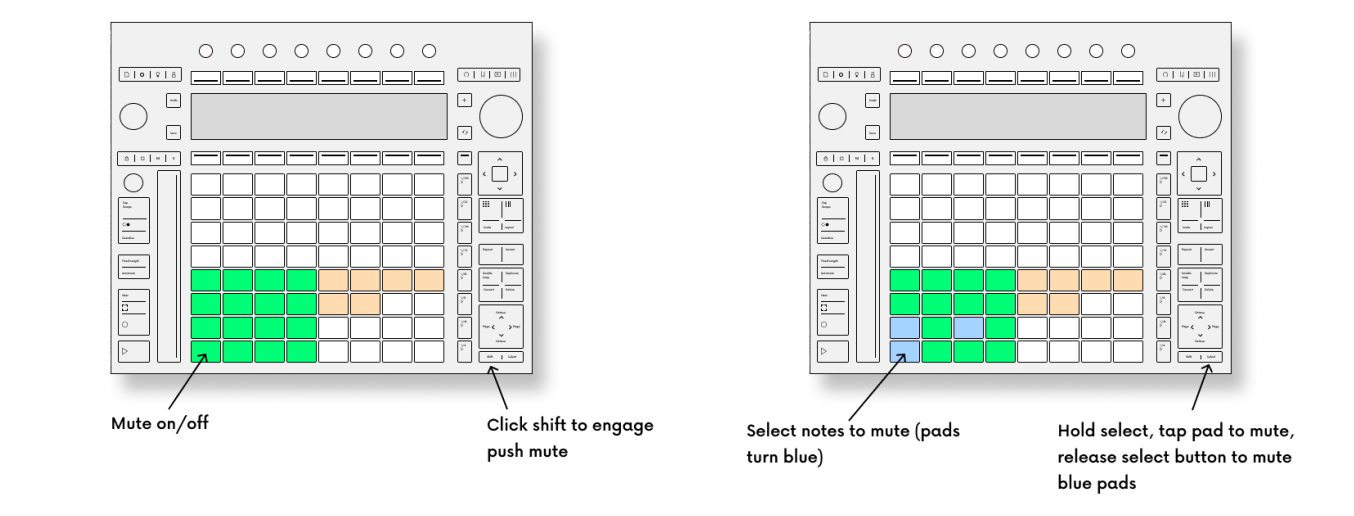
- Momentary means you hold the shift key down when muting; release it and mute mode toggles off again.
- Latch lets you tap shift to enter or exit Mute Mode — no tangled fingers/hands. It’s crucial to have that option.
From there, you get a surprising amount of functionality, though it’s all easy to access:
- Mute multiple pads by holding select and tapping/dragging across pads
- Save mute groups (cool!) by storing them as macros
- Use all 128 Drum Rack pads
- Push 3 standalone support
Push 2 and Push 3 are both supported; you’ll need Ableton Live 12+ with Max for Live (or Suite).
That’s it. There’s not a lot to say on this one — and that’s a good thing. It’s done so well that it feels like a native feature. And Ableton, I hope that means you’ll look at robust support for these solutions. As with Push:Euclidean Mode, Max for Live creators are often imagining ideas before native implementations. That was the intention of having Max for Live support in the first place, I’m sure, so the better this integration gets for users, the more creative people will be with the instruments. It’s a case of that engineering work building a foundation for a ton of creativity.
I can’t wait to play out live with this one; it’s already great in the studio.
If you buy something from a CDM link, we may earn a commission.
Push: Mute Mode by Isotonik Studios & Push Patterns
And if you like this, you’ll want to check Push:Euclidean Mode, too, as I’ve previously reviewed, also from Mark Towers. While Live 12.3 added something like this feature, there are more bells and whistles in Push:Euclidean Mode and — frankly, I’m sticking with it!
Craig Lowe, who co-created this with Isotonik Studios, explains Push:Mute Mode:
It’s worth checking his channel; I agree with this advice generally, for instance: