Apple has just made its release notes for MainStage 4 and Logic Pro 12 public, and we get some extra little details, from MIDI 2.0 in the Logic Step Sequencer to Ableton Link support in MainStage.
MainStage 4, like Logic Pro 12, is now available as part of Apple’s new Creator Studio subscription. But it’s also still available as a separate purchase on the App Store, and Apple continues its seemingly endless set of free upgrades. That means basically if you ever bought these apps on the App Store, the upgrade on macOS is waiting for you for free.
I also hope MainStage 4 is a sign that we’ll see MainStage for iPad, where it makes a whole lot of sense, but no news on that. The main news for MainStage 4 is full Ableton Link support, though there are also reliability, accessibility, and MIDI tweaks.
Ableton Link in MainStage 4
If you were expecting Link to show up on the transport bar, that’s not where it is. With a Concert (project) open in Edit mode, choose File > Concert Settings.
Under Timing, you’ll see a checkbox for Ableton Link. You’ll need to give MainStage network discovery privileges. Choose Transmit and Receive Start/Stop if you want to use not just timing information, but also transport control send and receive.
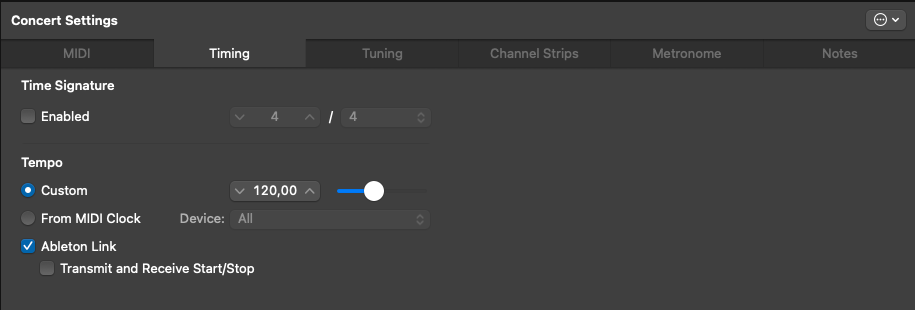
Apple describes Link as “sync,” but it isn’t sync in a hierarchical sense like MIDI Clock, with leader and followers. All connected clients have the ability to change tempo, collaboratively. This also means you can ignore start/stop, allowing connected clients to enter and exit at will — so you could stop your iPad, for example, but keep the desktop MainStage going.
Logic Pro 12 – lots of little tweaks
Let’s talk Logic Pro. As I’ve already mentioned, there’s now the ability to quick-swipe comps on the iPad, making that a great recording and comping tool. And there are a slew of new Session Player, Chord ID, and harmony settings. Also, Logic on the Mac now gets the same expansion packs that the iPad user does.
The iPad comping is really powerful — think Apple Pencil support for swiping through takes, Take Folders, and a massively rapid workflow.
But we knew all that. Here are some subtler improvements to check out.
Quantec reverb! Pre-delay, pre-cut, and pre-level controls are available. And QRS by the way supports surround sound, too — as if this weren’t already one of our favorite reverbs.
MIDI 2.0 data is displayed in the Step Sequencer. Apple was an early advocate of MPE, so it’s great to see them embracing the latest MIDI.
More Step Sequencer stuff. “It’s now possible to Copy/Paste/Clear individual pages in long Step Sequencer Patterns.” There are optimized 5/4 and 7/8 pattern length options. You can set a step to play only on the first or last loop of a Pattern region. There’s per-step note repeat and offset. You can look at note values by scale degree. There’s a lot more, too.
The Step Sequencer also includes new playback modes — both on iPad and Mac. Look for Pendulum, Brownian, Arp1, and Arp2. That Step Sequencer is really useful when using Logic as an AUv2 host.
Use Spatial Audio recordings from the iPhone.
Snappier! “Snap Regions to Absolute Value is now the default Snap setting.” Hell, yes; thank you. There is a lot of snap-related news. Scale Snap aligns MIDI notes to scale. There are fine-tune fixes to snapping generally. Even Alchemy gets something snap-related: “It’s now possible to fine-tune nodes in MSEG or Modmaps while Snap mode is active.”
There is a lot more — it’s a massive to-do list they’ve worked through. Enjoy:
Logic Pro for Mac release notes (Logic Pro 12 for Mac)
MainStage release notes (MainStage 4 for Mac)
Logic Pro for iPad release notes (Logic Pro 3 for iPad)
More on the harmonic features:
And of course there’s more to say on the rest of the creative tools from Apple, all of which get updated today:
Previously: