Ableton Live 12.3 hits public beta today, with stem separation and Splice integration, the ability to bounce groups as well as paste bounced audio, there’s a redesigned Auto Pan-Tremolo effect, and you get some new MIDI Tools and Pack updates, plus some extras you might miss like, finally, A/B parameter changes in devices. Oh, and Push has an all-new layout and more. Here’s what’s new.
This looks great, even if it’s not necessarily the must-download release that Live 12.2 was. 12.2 had some blockbuster device updates and the breakthrough bounce features, plus the essential inclusion of Max 9. Think of 12.3 more as the answer to that story, by adding Bounce Groups and Paste Bounce Audio to 12.2’s Bounce to New Track and Bounce in Place.
But because of all the focus on stems and Splice, you might miss some stuff that I’ll bet some of you care about more. And this bears saying: hidden in Live 12.3 is, at last, a pretty big Push 3 update.
And let’s get real, for all the good stuff, it’s all about the BOUNCE. Soundtrack, please!
Bounce Groups and Paste Bounced Audio
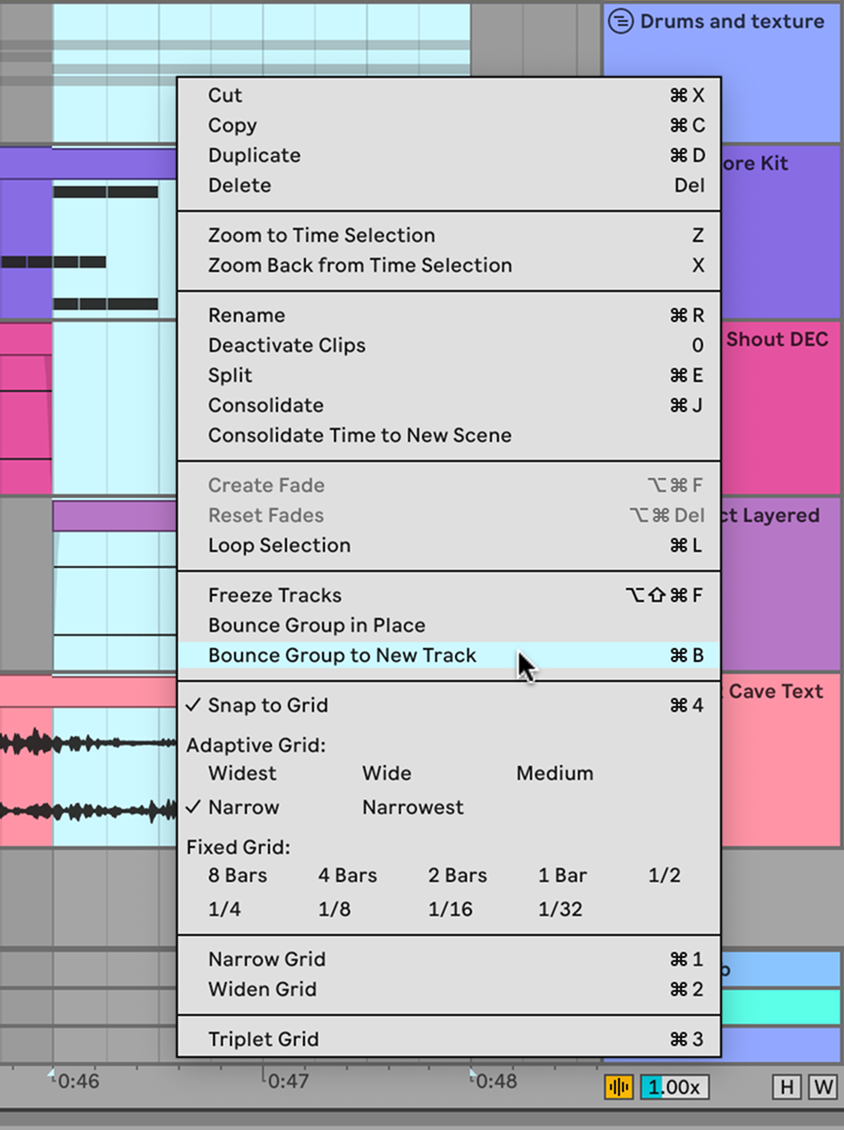
Yep, let’s be honest: this is the thing that would make you immediately switch to the beta (blah blah you’ll poike your eyes out, okay dad), because adding these bounce features to the existing bounce features means you can bounce everywhere all the time.
You can bounce groups.
Let me say that again — you can bounce groups. Groups, you can bounce them now. No more trying to bounce a group, and the group won’t bounce. The groups get bounced, with all the processing, because that’s what bouncing does.
The thing we didn’t ask for is just as cool: copy any clip or any selection, and paste it as bounced audio into any track, or even directly into a track lane. You can just keep repeating paste, too, as in — copy, paste the bounced audio, make some changes, paste bounced audio again (without repeating copy), and make a bunch of variations.
There will honestly not be a day when I am not bouncing now. I expect you may feel the same. Honestly, with all this fast bouncing and processing, you don’t really need Splice or stem separation. Yeah, I said it; no apologies.
A/B parameter compare
The single most important thing to do is to switch devices on and off.
The next most important thing is to A/B them to compare two parameter states.
Every single internal instrument, audio, and MIDI effect in Live now has a built-in A/B feature. It lives on the contextual menu for those devices. Unfortunately, it’s limited to internal devices for comparison, and doesn’t work in this release with plug-ins or Max for Live. I’m hoping this is just a first step and we see that later. (Logic, for instance, works fine with comparison with AU plug-ins.)
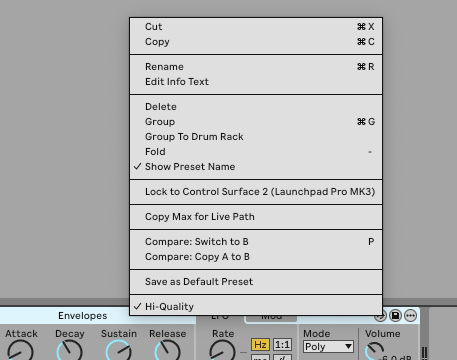
The main thing to remember is that P shortcut, for “parameter.” That lets you quickly compare states, which is great when doing sound design.
There aren’t a lot of Max for Live changes in this release, but here’s one of them: A/B compare is accessible in the Max for Live API.
Auto Pan-Tremolo
Auto Pan has grown into Auto Pan-Tremolo, the latest refresh of a “vintage” Live Device. It’s on Push hardware and, for the first time, all versions of Live (including Lite).
And it’s gorgeous. It just has this lovely visualization, plus new features:
- Two modes: Panning (modulations left/right positioning of source) and Tremolo (modulates level)
- New LFO Time modes, free-running (up to full seconds for long modulation) and synced
- Modulation Attack ramps up the level gradually based on an onset, to preserve transients (tremolo) or center position (panning) — subtle and really nice
- Frequency Modulation, which is maybe not what you think: it maps incoming signal level to LFO frequency. That’s a popular effect and never gets old, really — I talked about it in the dedicated BLEASS Dragonfly)
- Tremolo mode adds Shape and Invert to the waveform
- Harmonic mode modulates signal level across bands in alternating patterns
- Vintage mode adds some “warmth and grit” by using a non-linear curve rather than signal level
Let’s actually review where some of those are, as you might otherwise easily miss them.
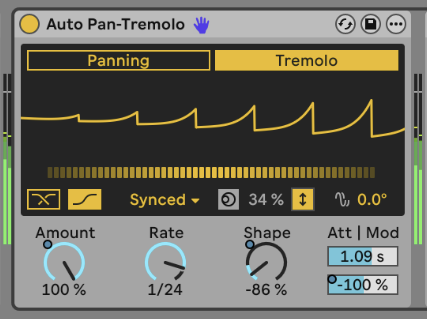
The Modulation Attack and Dynamic Frequency Modulation are essential. See the bottom right-hand portion of the Device. Attack Modulation is easy to understand as the visualization will show you ramping it up:
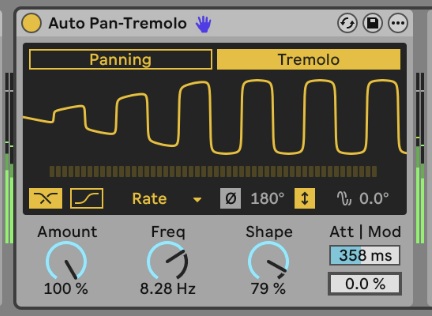
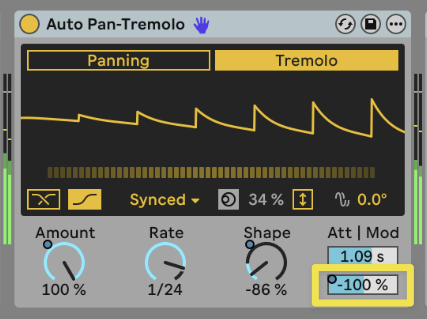
Just below it is Dynamic Frequency Modulation. (It’s labeled, but you’d barely notice — that’s what the ” | Mod” means, even though I first read it as “Att Mod.” Confusing; maybe this should be renamed “Dyn.”)
Anyway, this gives you that same signal-following tremolo as heard in Billie Eilish. And you can modulate this value with an external modulation device, as I’m doing here (note the dot)!
Invert and Harmonic modes are both really cool, so I trigger them in the demo sketch below. Look below the waveform display for these options (it’s worth turning on the Info View for a reminder). Invert gives you this nice shape:
Let’s put it together. Here’s a jam I made over the weekend while testing the beta. I did use stem separation — on my own material, which is a fascinating way of resampling.
That’s Dillon Baston’s Emit (labeled as the preset) at the start, part of Inspired by Nature.
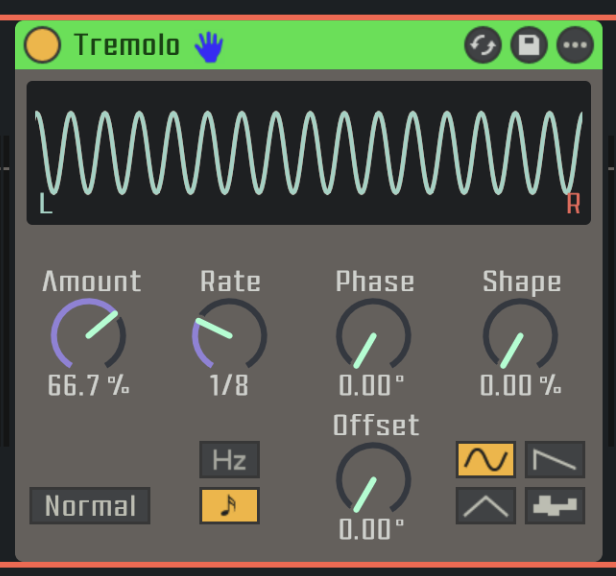
(Side note: Live didn’t have something called “Tremolo” before. I imagined it did, through a sort of Mandela Effect. That’s probably because there is a preset for Auto-Pan called “Tremolo,” pictured here. But you’ll notice from the settings that this is still Auto-Pan, so it was not a true tremolo; for a crude but accurate version of that, you needed an LFO and gain. Side note to the side note: someone should totally create an audio effect called Mandela, although don’t we all kinda feel like someone did already?)
Max for Live updates
12.2, as I said, was the big one because of Max 9 integration. But you do get some new API hooks:
- Track.insert_device and Chain.insert_device
- RackDevice.insert_chain
- DrumChain.in_note (which you might use when inserting a Drum Rack with the above)
- plus A/B support
- There’s a bug fix for clip IDs when moving things around in the arrangement
Note that for now, at least, Track.insert_device and Chain.insert_device work only with built-in Devices, and not presets or Max for Live Devices. Hopefully this is just a preview of what’s to come, though!
So I could imagine someone doing something or other with managing device insertions, like an intelligent template. I’ll leave that to you.
Splice integration
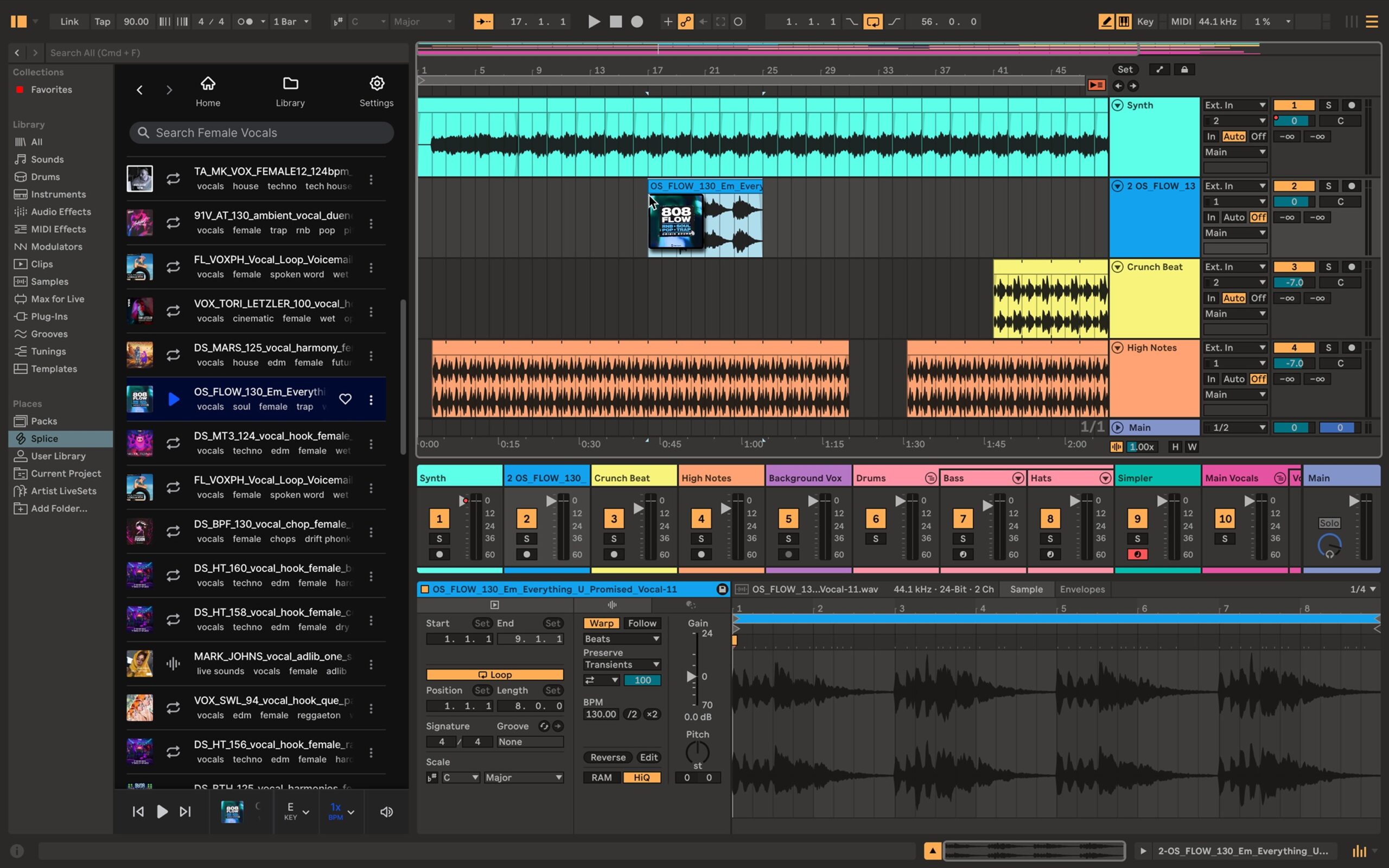
This one’s simple: the Splice royalty-free sample library is now available right inside Live’s Browser, if that’s a preferred sample source for you. That integration works nicely enough, though, of course, competitors will continue to offer plug-in access (as I reviewed in Loopcloud Sounds).
From social media, it seems like this was an anticipated feature. And I expect Ableton is rolling it out with stem separation with the assumption that some folks will use the two in tandem.
“It’s the end of music” check! I mean, I guess. Sample/loop content is kind of old news at this point; even DAW integration is something we’ve seen before. This makes it more convenient to access and automatically matches tempo and key without installing a plug-in. But if you don’t like it, you can turn it off:
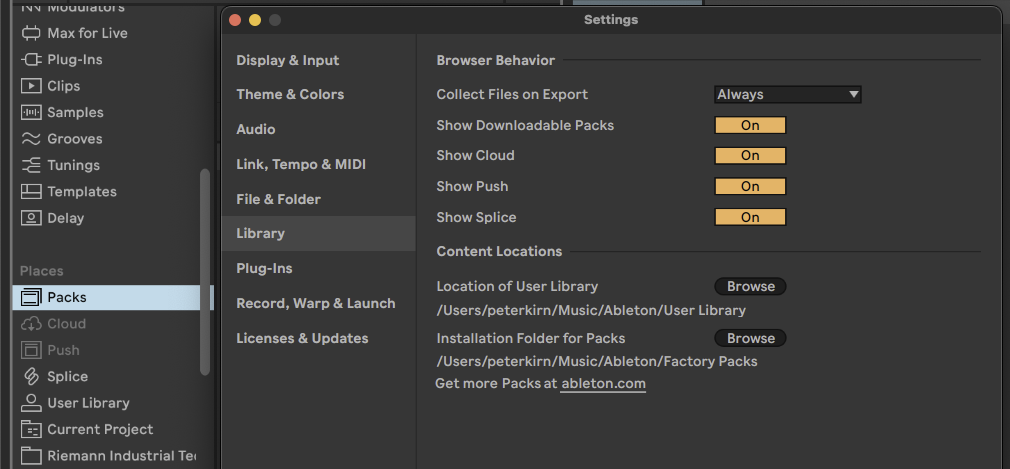
…which I forgot to do because it’s so unobtrusive.
Atsushi Nakayama a.k.a electrounin of the Ableton User Group Tokyo shows it working with Redux (the plug-in version of Renoise) running in Live as a host so — honestly, cool. And as Atsushi-san observes, FL Studio has FL Cloud and Elektron has Loopmasters. We have so many ways of making sound at this point that you may not have noticed.
Stem separation
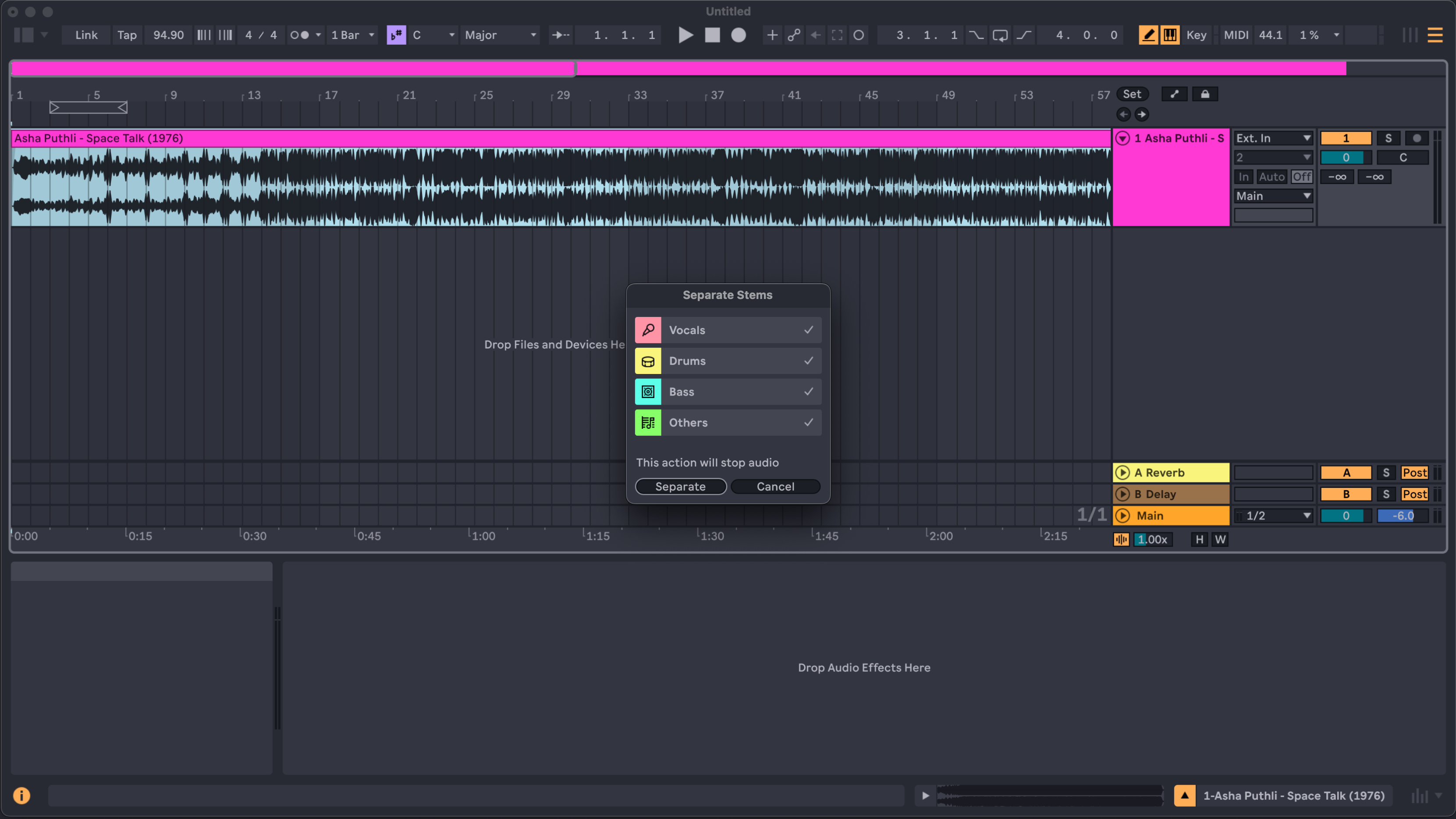
This work as you’d expect: it’s machine learning-powered stem separation. It’s nothing new; I’ve talked about implementations from Apple in Logic Pro and Serato across their product line. But there is something inspiring about having it inside Live, because just like slice-to-MIDI or even applying melodic analysis to tracks, it’s tempting to use and even abuse on your own material. (Why not feed it something that absolutely definitely won’t match the algorithm?)
I didn’t get to test this on a Windows PC; on my M1 Mac, it was speedy enough. (It’s not real-time, but then you don’t need it to be.) And I do absolutely recommend enabling the high-quality flag. In options.txt, Live’s “hacker” functionality for setting hidden options, set:
-_Feature.StemSeparation.HighQuality=True
There’s nothing particularly revolutionary here; stem separation is becoming a kind of leapfrog feature. I can investigate more how they managed training sets and what sort of material delivers the best results.
It’s the end of music check/Ableton will spy on your data! This process is entirely local, so no, it’s not. This is just another local machine learning application, much like the “similar sound” search. You’re not sending any sound data to Ableton. And as for ownership of whatever you’re separating, sample clearance with stems is in fact no different than sample clearance for the entire material.
The remaining problem with all machine learning-powered stem separation is that they can introduce artifacts, particularly depending on the source content (not only its fidelity but how it relates to the training set). But this should be a spearate discussion; let’s get back to other fun stuff in Live.
More tools
Some extra additions got packed into there, including MIDI Tools from Iftah, in the new Generators Pack (Standard/Suite):
- Sting, our beloved acid bassline generator that’s way more than just an acid baseline generator, is now available as a MIDI Tool
- Patterns produces percussive rhythms
There’s a lot more to say about MIDI Tools and generation — separate review of Noah’s stuff coming later this week (overdue, sorry)! Sting works great as a standalone device, of course; I’ve been using it to generate rhythms:
There are also updates to Ableton’s existing Sequencers Pack (they now follow the position of the Arrangement rather than resetting and falling out of sync) and Expressive Chords Pack (Chord Edit Mode).
New in Push
This is a significant update for Push. It doesn’t yet have the User Mode we’ve been waiting for, but you do get a new expressive XYZ layout, new Rhythm Generator layout, and more. What’s new:
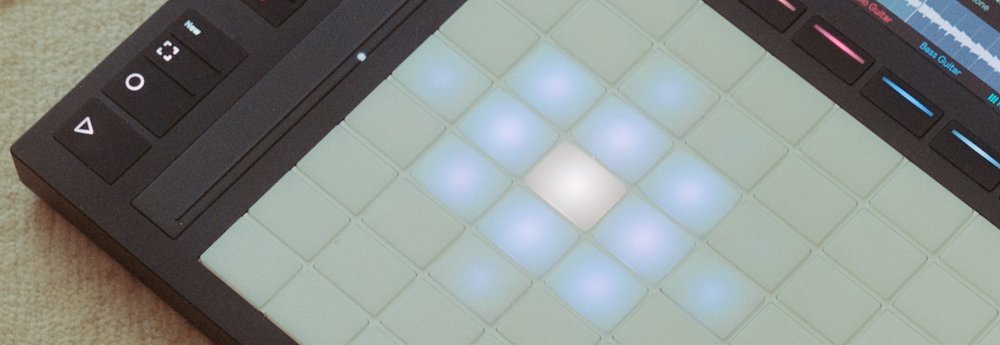
XYZ Control: this new layout maps a Rack to X, Y, and Z (pressure) on the pads, with any Audio Effect, Instrument, or Drum Rack. And you can use the same rack/layout combo to make your own mappings. The cool thing is, you can map on the fly on Push: touch any of the dimension pads and bring up Edit XYZ on the display, and map macros as you wish.
Rhythm Generator. Yeah, this is a lot like Push:Euclidean Mode from Mark Towers, which I’ve reviewed, except it works with Ableton’s own Rhythm MIDI Tools. It is absolutely a Euclidean generator, and it’s great to have one built into Push. That also solves some of the wrinkles with takeover mode. That said, I wish Ableton would resolve some of those issues for Max for Live developers, because Mark’s device has some extra options that this lacks.
There’s more, though:
Touch Sensitive Step Editing. Finally! Hold Accent, and slide up and down on a step to change the velocity. You can even slide across multiple notes in a sequence to make a curve.
It’s exactly this kind of gestural interaction that we were waiting for on Push 3; it’s the answer to the question “why would I want Push 3 if I have Push 1/2?”
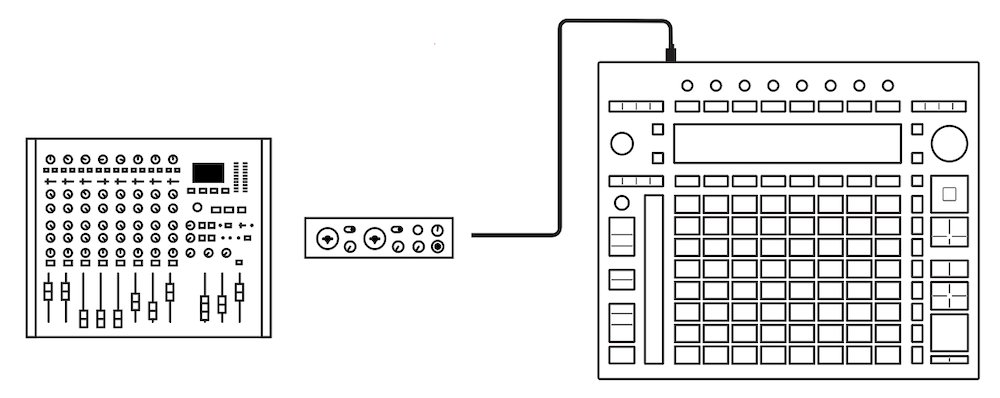
External Audio Interface Support for Push 3 standalone. Push 3 has only a basic audio interface, which limits its utility in standalone mode. You could get around that with ADAT, but finally, USB Audio Class is supported, too, for other devices.
Stem separation is updated, too, and I think so is Auto Pan-Tremolo (forgot to test that).
See the dedicated Push release notes:
Push with Live 12 – Beta Release Notes
Go get it, ask questions, find add-ons
The beta is available here:
Live 12.3 is coming – with Stem Separation and more
Let us know if you’ve got questions.
Oh and if you’re hungry for more Ableton Live customization, we still have a CDM-exclusive deal at Isotonik Studios through tomorrow, Wednesday. All of this works great with Live 12.3:
Plus I am 100% about to install these themes in the beta, too; I miss them already:
Updates/edits: Some minor clarifications and amplifications, September 2/3:
- Clarified restrictions on Max for Live API hooks (internal devices only)
- Confirmed and clarified A/B restrictions (internal devices only)
- Added note that Auto Pan-Tremolo is available on Push 3 and Push 3 standalone (as well as in Lite)
- Added “end of music” alerts to Splice integration and stem separation sections, including adding a reminder that stem separation is entirely local
- Clarified update to Sequencers Pack news (they respect position in Arrangement)