The simple, immediate UI of Cluster, the fourth plug-in in Sinevibes’ Dynamic Collection, belies a deep engine. Yes, this is a multi-filter with a sequencer, and yes, with the same ability to sketch in ideas quickly or roll the dice. But you can push the filters inside to open up worlds of sounds.
Sinevibes’ attention to detail is simply stunning. And that’s something that doesn’t fit into just a screenshot or spec sheet. But Artemiy at Sinevibes has done a ton of obsessive work here, from surprising presets and exhaustive, easy-to-read documentation to lots of tweaks to the engine to make it perform as fluidly as possible. You can just mess with everything, up to and including randomization or toggling between patches, without the engine ever missing a beat. And that’s rare in software; plug-ins too often hiccup. This has the feeling of a high-end effect.
Packed into this engine is a whole lot of goodness — who says software can’t give you a top-of-the-line sound experience? Across Mac, Windows, and Linux all three:
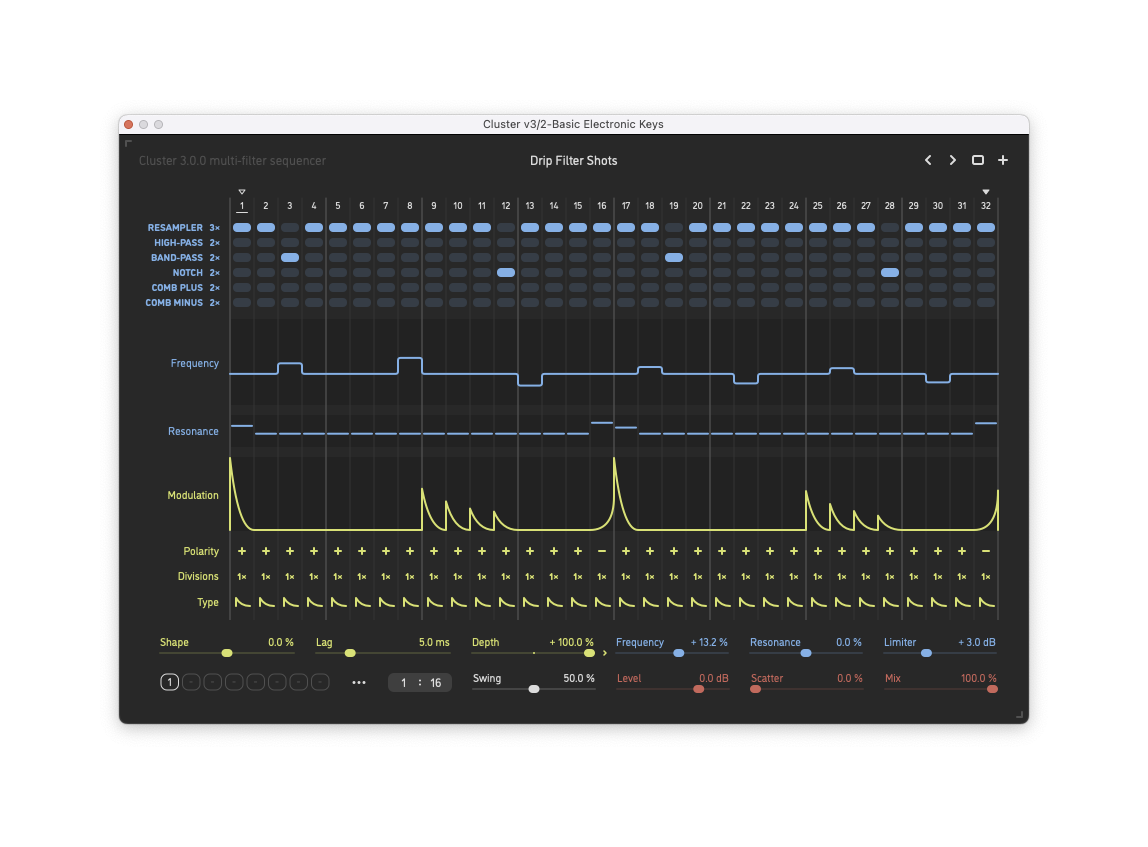
- Two-pole analog-style lag filter for smooth out all step transitions (you have to just hear this to appreciate it)
- 6 different filter types: low-pass, high-pass, bandpass, notch, peaking — all those state variable filter-style, 12 dB/oct curve by default– plus positive and negative comb, phaser (multi-stage all-pass), and interestingly a “resampler” type
- 4 sequential filter stages — meaning the state variable filters can be -12, 24, 36, or 48 dB/octave
- Four parameter lanes
The resampler filter alone opens up some other possibilities; it’s a variable sample rate converter combining 6-pole low-pass filter, 24-point sinc interpolator, and a feedback line, opening up a bunch of effects. Say what? Just — trust me and mess with that bottom row.
Now, if you do know the other effects in the Dynamics Collection, there’s a lot you’ll already know about Cluster. And that’s a good thing, because all the usual shortcuts work. You can copy and paste and randomize and drag and draw and come up with patterns really, really fast.
A quick refresher on those keyboard shortcuts:
- shift-drag sliders for fine control
- use the scroll wheel to adjust values
- hold control and edit all steps on a lane at once
- shift+ctrl edits all steps at once in fixed steps
- option/alt-click a lane to randomize steps on that lane only (or randomize everything at once with the randomize command)
- option/alt-click or double-click a control to reset it
- hold shift to adjust frequency, resonance, or modulation with quantization
That’s an idea maker. It’s more than just hitting randomize on everything (the “cat walked across my computer” approach to sound design). You can just opt-/alt-click a lane for some gentle randomization, leaving other stuff untouched, and click a couple of times until you loosely get the pattern you want, then go back for fine edits as needed. That way you can just say, “I want some motion here,” and drag or click your way into something happening quickly.
I’ve been playing with builds for the last couple of weeks. Here are some examples.
If you want a ton of rapid glitching action, you absolutely can get that. Here it is in action with Baby Audio’s Tekno (see my previous review and sound set).
And for something entirely different, I created a chilled-out track idea in a few minutes just working with KORG’s excellent recent hardware modeling plug-ins from KORG Collection and added Sinevibes plug-ins of various types, with Cluster v3 at the center. This is really unmastered, too; just the raw sound of Sinevibes stuff:
It is really worth looking through the presets, too, as Cluster is capable of granular-style, extreme filtering surprises, and Artemiy has given you some clever pointers that you probably wouldn’t have thought of. It’s like having some guidance from an engineer.
So even if you don’t go through each preset normally, do it. Even if you don’t randomize, randomize — especially per-lane. And even if you don’t read manuals, read this manual. Cluster is a gem and perhaps the most indispensible, well-honed tool from Sinevibes yet.
All of this is packed into a newly refined, color-coded UI that’s the culmination of a lot of Sinevibes iteration over the years.
Cluster v3 is US$49 on its own. I think it is worth getting the full Dynamic Collection; the consistency across UIs and the range of possibilities in each engine makes these tools work well as a suite. That’s $79 for the set.
Cluster multi-filter sequencer – AU/VST3/AAX
https://www.sinevibes.com/desktop
Previously:
Here are Sinevibes’ own mind-bending examples. Listen to that filter slap: