It’s Hot Cues for Ableton Live, or cue points for Push for Live for Max for Live. Finally, those handy cue points can be triggered, with a ton of nice visual extras. That was a long-missing feature for DJs, but it might be an even bigger hit for live sets or improvisatory production. There’s a reason that deadmau5 logo is in the corner.
This is one of those times where we can spend a few bucks and get the kind of custom solution that the superstars can go and commission. And it’s really nicely done. You do need a Push 2 or Push 3, so it’s not the solution for everyone — yeah, Ableton, a native solution would be nice. But in those contexts, this works perfectly, and it’s tailored to hands-on control and quantization from the Push.
It’s all about working in the Clip workflow and Session View — in Arrangement View, you can already locate to Markers, so there it wouldn’t be logical. (Maybe that’s obvious, but just to be clear!)
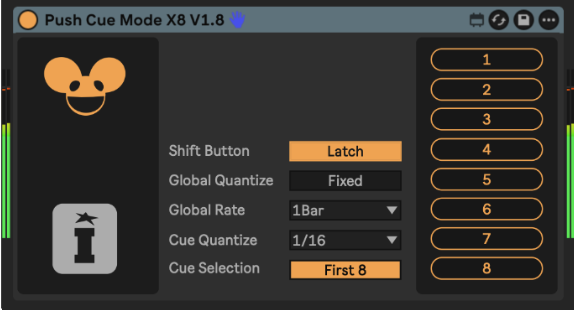
Features:
- Each audio clip can have 8-64 hot cues
- Those Warp Markers are automatically mapped to the Push’s buttons, so you can immediately get hands-on with your clips (useful even when you’re breaking some creative blocks in production, not only onstage)
- Visual feedback on cues: there’s a running light and highlight colors to follow (check the video)
- You can temporarily override the global quantization settings while your trigger
- Quick reset, feedback controls
You can even highlight favorites. It’s not really a replacement for the DJ tools in my mind, but this finally makes Warp Markers something you can navigate more easily. Note that it makes the most sense to play around in Controller Mode, as Push 3 standalone doesn’t yet let you add and edit Warp Markers, but if you prep those cues in advance, you could definitely use this as a standalone solution, too.
Check the walkthrough:
And yeah, another Isotonik Studios joint:
Push: Cue Mode by Isotonik Studios
If you buy something from a CDM link, we may earn a commission.